

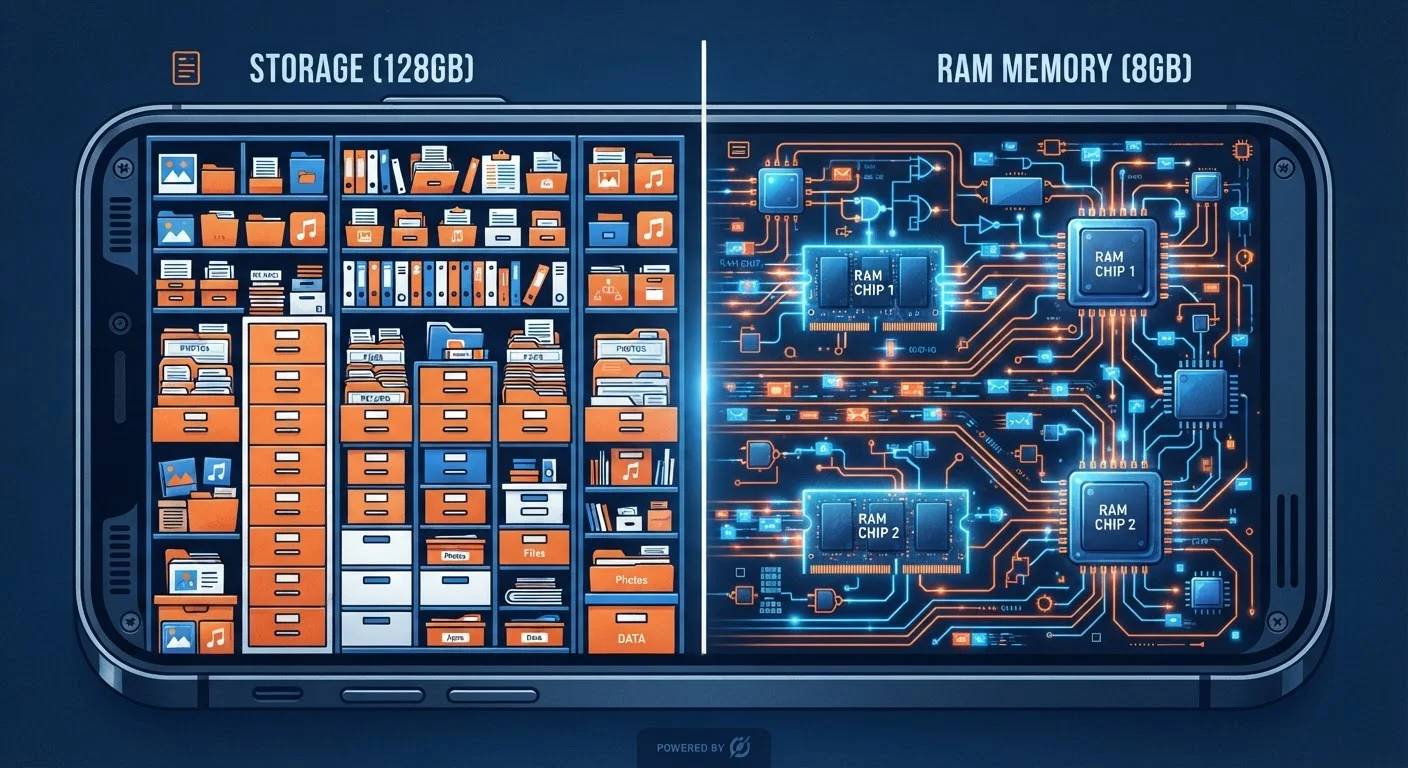
The Simplest Way to Tell Them Apart
Think of your device like a physical office. Storage is the filing cabinet - it holds everything you've saved: your photos, music, downloaded apps, and documents. That cabinet stays intact whether the office is open or closed.
Memory (RAM) is your desk - the active workspace where you spread out whatever you're currently working on. The bigger the desk, the more tasks you can juggle at once without things falling off the edge. But when you leave for the night, the desk gets cleared.
That one analogy explains the most important difference: storage is permanent until you delete something; memory is temporary and resets every time your device restarts. Both matter, but they solve different problems.
64-256 GB
Typical smartphone storage range
Most mid-range smartphones sold in recent years ship with 64 GB to 256 GB of onboard storage as standard configurations.
6-12 GB
Common RAM range in modern smartphones
Mid-range to flagship Android and iOS devices generally include between 6 GB and 12 GB of RAM, with premium models reaching higher.
10x+
Speed advantage of RAM over flash storage
RAM access speeds are orders of magnitude faster than even high-speed flash storage, which is why active processes must run in RAM rather than directly from the drive.
What Storage Actually Does
Storage is where your device keeps data long-term. Every photo you take, every app you install, and every song you download lives in storage. It's measured in gigabytes (GB) or terabytes (TB), and when it fills up, you literally cannot save anything new.
Most consumer devices use a type of storage called flash memory - the same technology inside a USB thumb drive, just faster and built into the device. It holds data without needing power, which is why your files are still there after you turn your phone off and back on.
Common storage capacities you'll see on smartphones and tablets today range from 64 GB on entry-level devices to 512 GB or 1 TB on higher-end models. On computers, hard drives and solid-state drives (SSDs) can hold several terabytes. The right amount depends entirely on how you use the device - heavy photo and video users need significantly more than someone who mostly browses the web.
If you want to learn more about how your devices connect and communicate, see our plain-English home network explainer for helpful context.
What Memory (RAM) Actually Does
RAM - Random Access Memory - is your device's short-term workhorse. When you open an app, your device loads it from storage into RAM so the processor can interact with it quickly. RAM is dramatically faster than storage, which is why active tasks need to live there rather than on the drive.
When you switch between apps, your device tries to keep recent ones in RAM so they reopen instantly. If your RAM is full, the operating system has to unload something to make room - and the next time you go back to that app, it reloads from scratch. That's the reload delay many users notice and mistake for a slow internet connection or a bug.
Don't Force-Close Apps to Save Memory
Manually closing every background app is a common habit, but modern operating systems manage RAM automatically and efficiently. Force-closing apps often causes them to use more resources when they reload than if they'd been left in the background. Save this step for apps that are genuinely frozen or misbehaving.
RAM is also why closing every app manually rarely helps as much as people expect. Modern operating systems are designed to manage RAM automatically - they unload things that haven't been used recently and keep frequently used processes available. Constantly force-closing apps can actually cause more reloading, not less.
Why the Confusion Happens - and Why It Matters
The word "memory" has been used colloquially to describe both RAM and storage for decades, and manufacturers haven't always been consistent. Older devices used a type of storage chip that was literally called "memory," blurring the line further. Today, the terms are still used interchangeably in everyday conversation, even though they describe completely different hardware.
The confusion matters because the two problems have completely different solutions. If your device is slow, adding cloud storage won't help - you may need to close background apps or consider a device with more RAM. If you keep getting "storage full" warnings, clearing RAM does nothing - you need to delete files or expand storage capacity.
A user's phone constantly warns them that storage is full, even though apps seem to open quickly.
A laptop with only 4 GB of RAM struggles when a user has a browser with 10 tabs, a spreadsheet, and a video call open at the same time.
Someone buys a budget tablet with 32 GB of storage and 2 GB of RAM, expecting it to handle gaming and multitasking.
Understanding the distinction also helps when you're evaluating a device's spec sheet. A phone listed with "128 GB / 8 GB" has 128 GB of storage and 8 GB of RAM - two separate numbers that each tell you something different about how the device will perform and how much it can hold. For more on getting better performance from devices you already own, see our guide to getting more from a device you already own.


